Custom software engineering

Software your team actually uses.

Systems a business depends on every day, purpose-built and operated afterwards. What follows is not a promise: it is in production right now.

26 automated jobs · a backup restored every week · running right now

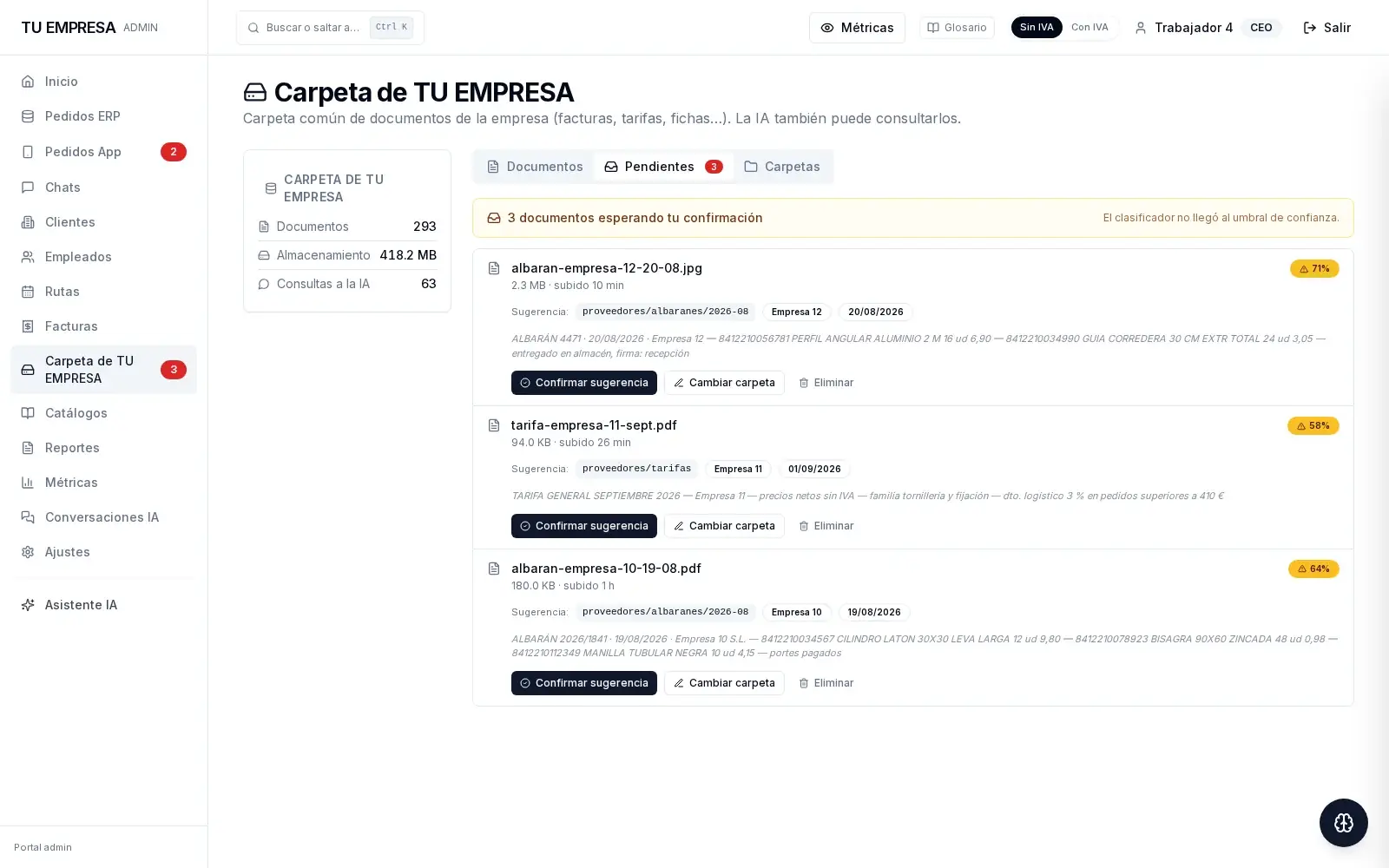
Documents screen: three supplier delivery notes awaiting confirmation, with the lines the machine has read — items, quantities and purchase price — and its confidence percentage

A machine read this, not a person.

1,628 automated checks

1,628
automated checks
2
services that never stop
26
scheduled jobs

verified on the machine

First proof · the commercial platform

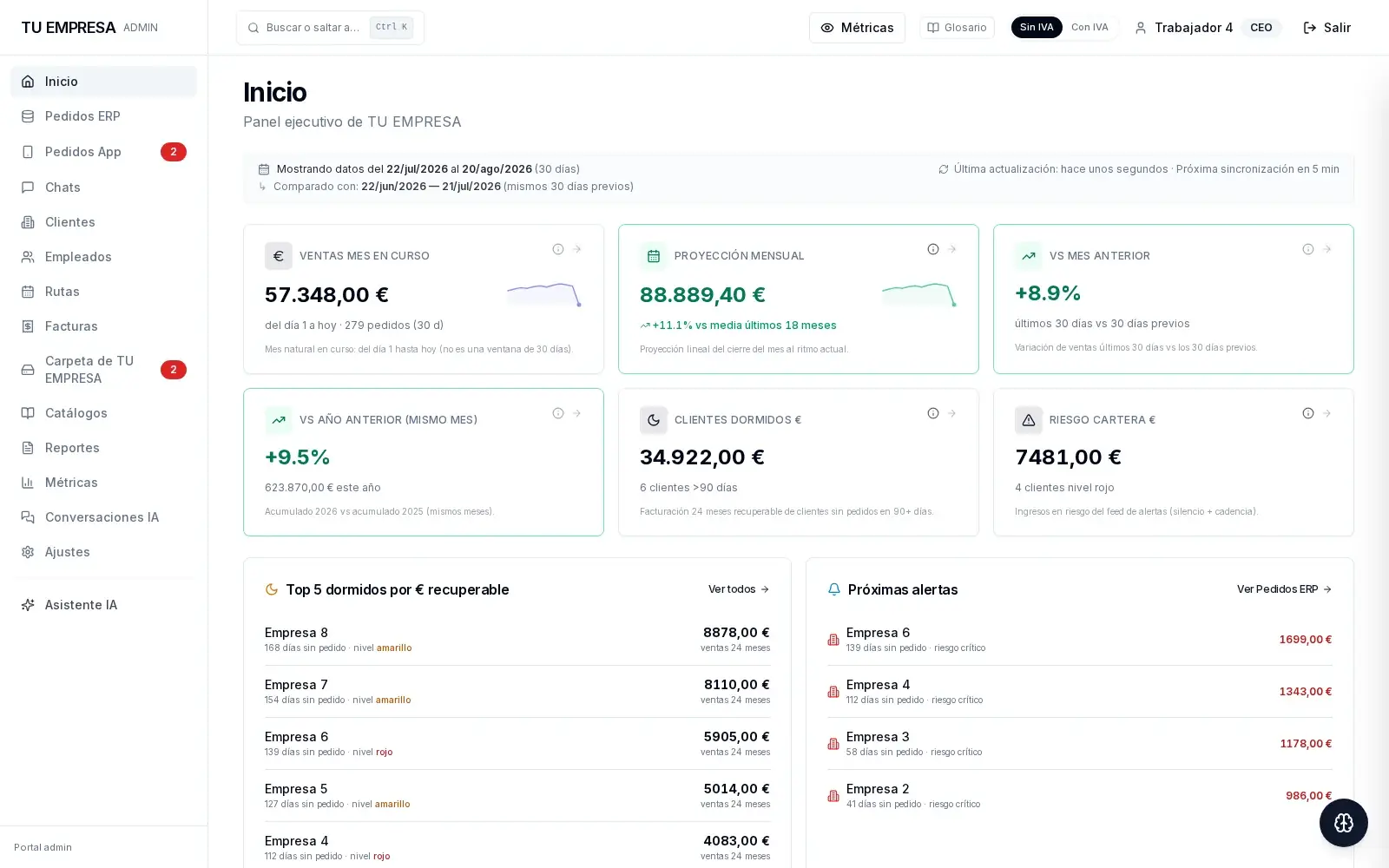
The platform runs the day-to-day of a distribution company: orders, stock, prices and routes.

One application in the office, on the road and in the warehouse, used every day by a real company. This is one working day inside it.

A real working day, inside the platform

08:02

Yesterday's work is already today's plan, with no double entry.

Here, the orders a rep sent from the phone. At another company, the job sheets, the appointments or the delivery notes someone retypes today.

12:41

The figure your people see out in the field is the real one, to the second.

Here, the stock and price at the customer's counter. At another company, the availability, the rate or the record that can't be out of date.

17:15

The same figure in three places, with nobody copying it from one sheet to another.

Here, what was sold on the road already picked in the warehouse. At another company, office, field and workshop looking at the same thing.

02:00

The jobs nobody wants to do run on their own overnight.

Here, tomorrow's demand forecast. At another company, the closing, the reconciliation or the 9 a.m. report. The working day ends for the people; not for the system.

A real working day, inside the platform

A laptop, a phone and a warehouse terminal showing the same system across one working day

08:02

Yesterday's work is already today's plan, with no double entry.

Here, the orders a rep sent from the phone. At another company, the job sheets, the appointments or the delivery notes someone retypes today.

12:41

The figure your people see out in the field is the real one, to the second.

Here, the stock and price at the customer's counter. At another company, the availability, the rate or the record that can't be out of date.

17:15

The same figure in three places, with nobody copying it from one sheet to another.

Here, what was sold on the road already picked in the warehouse. At another company, office, field and workshop looking at the same thing.

02:00

The jobs nobody wants to do run on their own overnight.

Here, tomorrow's demand forecast. At another company, the closing, the reconciliation or the 9 a.m. report. The working day ends for the people; not for the system.

What happens afterwards

2 services that never stop · 26 scheduled tasks · running right now

Building it is the easy half.

The hard part is keeping it up on a Tuesday in August at three in the morning, with nobody watching.

  1. A backup that has never been tested is not a backup.

    Every week one is actually restored, just to prove it can be.

  2. Known security flaws take weeks to reach anyone.

    Dependencies are checked every week against the public list of known vulnerabilities.

  3. Data drifts out of step slowly — and you find out late, the hard way.

    It is reconciled every night against the source system.

  4. Nobody can watch a server all day.

    Automatic checks run every day and every week, and each one leaves a record of whether it passed or failed.

What you can commission

Five jobs that stop being done by hand.

Not a menu of services: concrete jobs, each solved in a real system and in production today. Commissioned on their own or as part of something larger.

Paperwork arrives on paper or PDF and someone types it in, line by line.

It is read automatically: items, quantities and amounts. One person confirms; nobody types.

Documents screen: three supplier delivery notes awaiting confirmation, with the lines the machine has read — items, quantities and purchase price — and its confidence percentage
Real screen, in productionFIG. 01 / 05

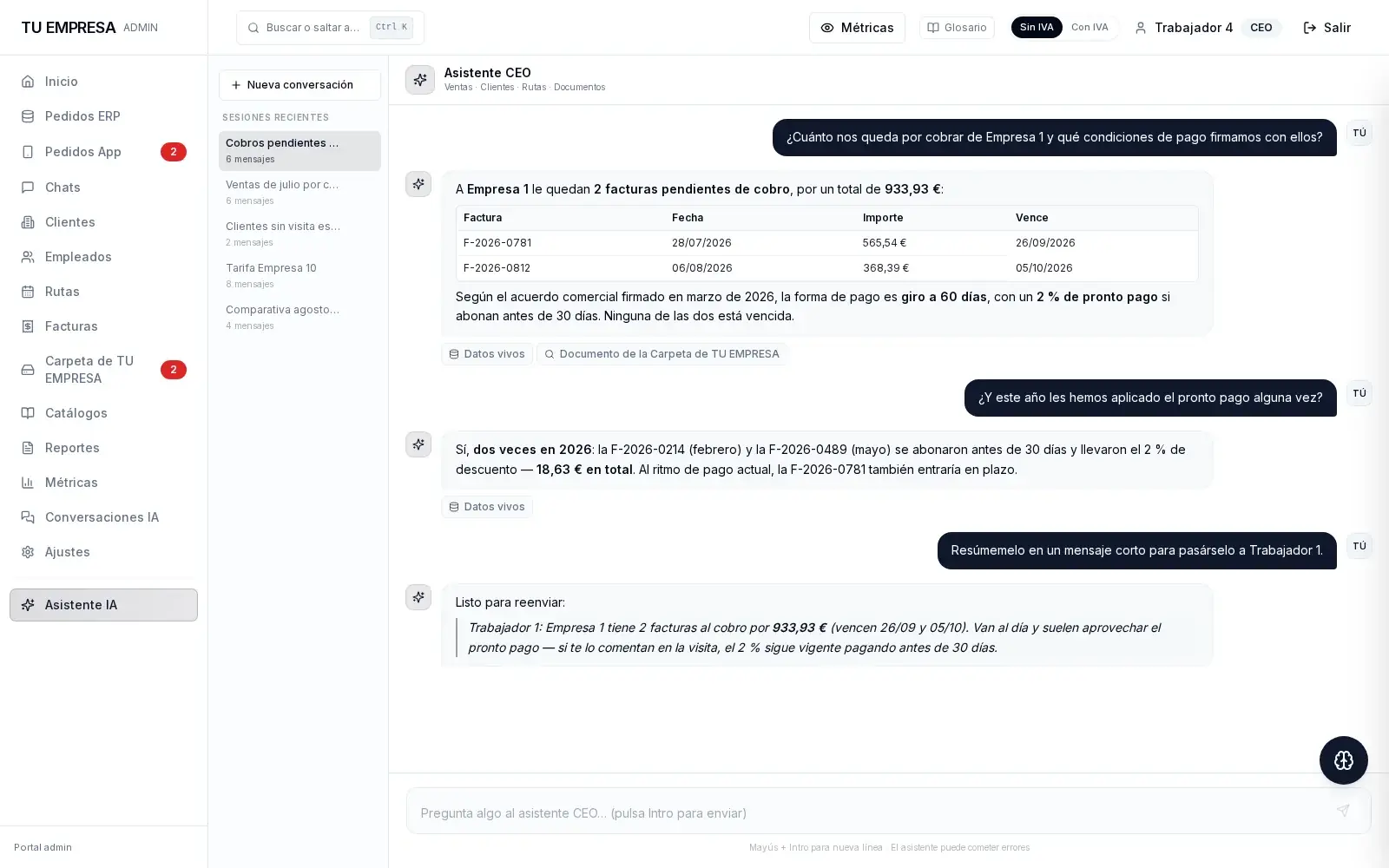
The answer is in some document nobody can find in time.

Ask in plain words and it answers, citing where every figure comes from.

Assistant screen: a question about what a customer owes, answered with the invoice table and the signed terms, citing where each figure comes from
Real screen, in productionFIG. 02 / 05

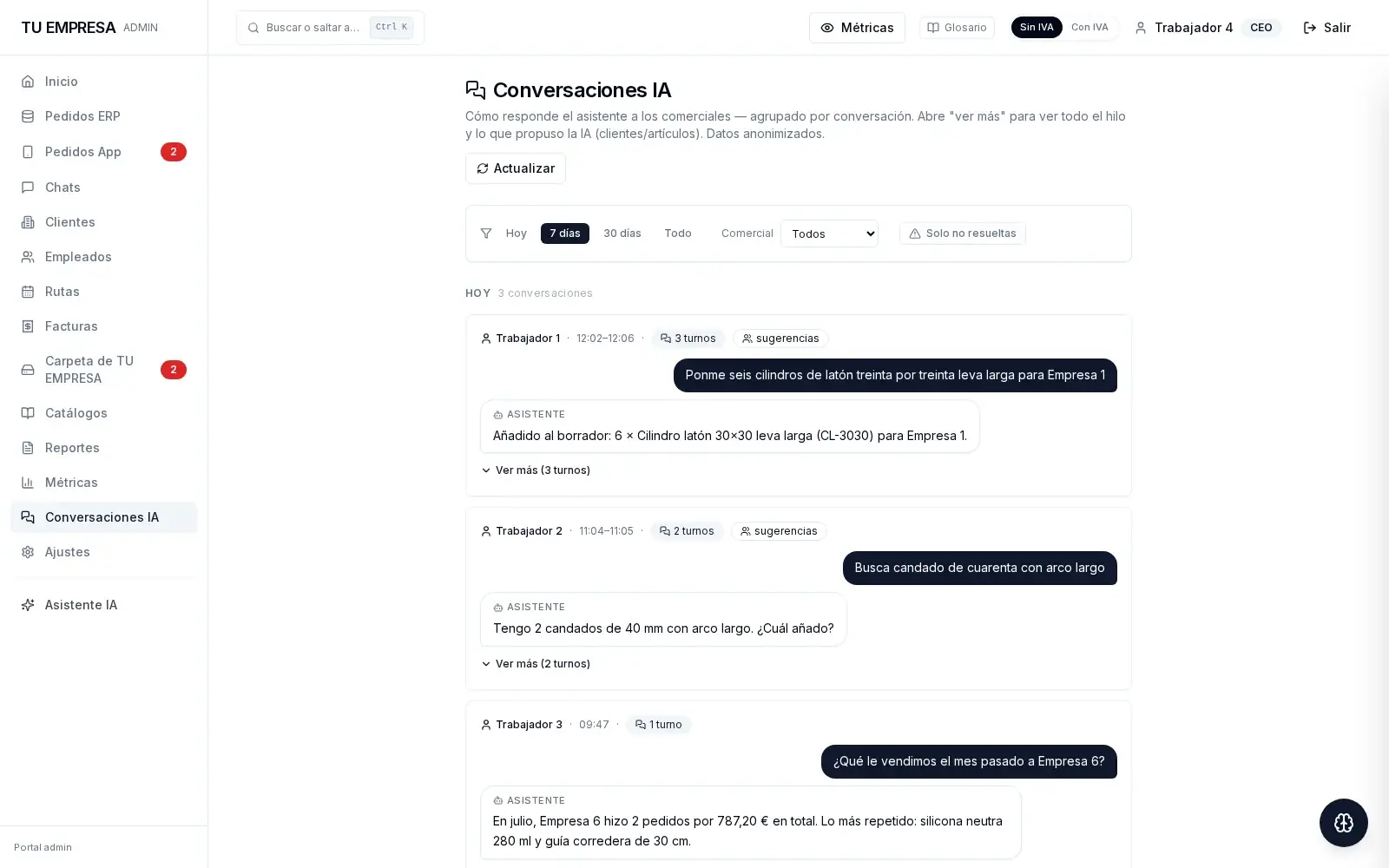
What is said out loud — on the road, on site, on the phone — gets lost.

It is written down, with the time and with what the system understood, with nobody transcribing it.

Conversations screen: the orders sales reps have dictated during the day, with the time and what the system understood
Real screen, in productionFIG. 03 / 05

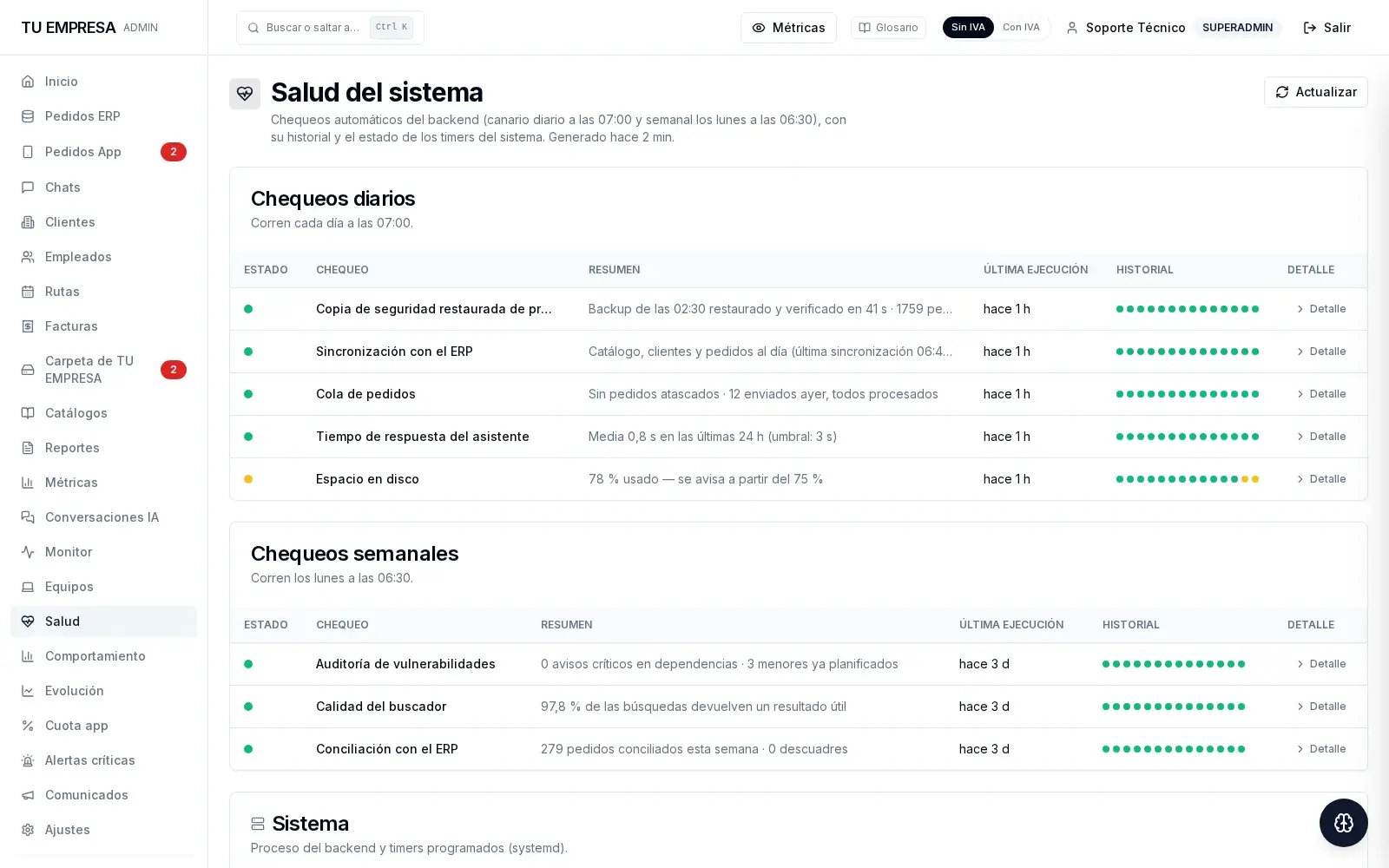
Nobody checks whether the system is still up — until it isn't.

It checks itself every morning, and the record of the last two weeks is kept.

System health screen: daily and weekly checks in green, with the history of the last two weeks and a backup restored and verified
Real screen, in productionFIG. 04 / 05

The numbers are reconciled by eye, and the mismatch shows up late.

They reconcile themselves and stay verified, month after month, with the detail in view.

Hours screen: a month of shifts, rotations and overtime reconciled automatically, with the checks that verify the totals add up
Real screen, in productionFIG. 05 / 05

How what is delivered gets verified

What is delivered is verified, screen by screen.

Every system ships with automated checks that open the real application and walk it end to end. Not a demo: the app running, verified on its own.

In SmartTS — hours tracking for a large company — 1,628 checks walk it screen by screen, every time.

1,628 automated checks · more than a thousand open the real application

SmartTS · one of the applications those checks run against
  • opens and responds
  • the rotation adds up: 17 → 31
  • coverage: 15 days · 0 gaps
  • the totals add up
  • every entry passes validation
SmartTS · one of the applications those checks run against

A distribution company and a field-service multinational have nothing in common. That is exactly the point: custom software is built on your operation, not on someone else's.

How the work is done

What to ask before commissioning software.

  1. Who maintains it after delivery?

    RUBRO. Delivery does not close the job: the system stays in operation, watched every day and every week. Everything above is not a sales pitch; it is the routine.

  2. What if RUBRO isn't here tomorrow?

    Nothing lives in anyone's memory. Every system is delivered documented, with its tests and with checks that leave a written record. A competent team could carry it on without calling us.

  3. How much does it cost?

    It depends on the job, which is why there is no number here. The first project can be small and tightly scoped: a way to judge us on facts before committing to more. The call costs nothing.

Start with what is holding you back.

Twenty minutes on your operation, no obligation. Pick a slot.

  • 2 services that never stop · 26 scheduled tasks · running right now

  • verified on the machine

System health screen: daily and weekly checks in green, with the history of the last two weeks and a backup restored and verified
Real screen, in productionFIG. 04

Loading available times…

The booking is registered on the spot. The call is taken by the engineering team.